Connect GitHub’s MCP server to Claude. Now check your token counter before sending a single message. 46,000 tokens, 22% of Claude Opus’s context window, consumed by tool definitions you haven’t used yet. Add Jira (another ~17K), a Slack server, Google Drive, and you’re pushing 100K+ tokens of overhead before any actual work begins. Anthropic benchmarked internal setups reaching 134K tokens in tool definitions alone.
Every MCP tool you connect is a tax paid upfront, whether the tool gets used or not.
This is the default behavior of MCP clients today: load all tool definitions into context at the start of every request. The spec doesn’t require it. It’s just the path of least resistance, and it scales badly.
Why This Happens
MCP servers advertise their tools as JSON schema objects: names, descriptions, parameter types, required fields, examples. These schemas are useful. They’re how Claude knows what a tool does and how to call it correctly. But “useful” and “needs to be in context at all times” are different things.
A five-server setup (GitHub with 91 tools, Jira, Slack, Google Drive, a custom internal server) might expose 140 tools in total. At roughly 400-600 tokens per tool definition, that’s 55K-85K tokens gone before you’ve asked a question. The model also degrades under this load: Anthropic’s benchmarks show tool selection accuracy collapses as tool count grows, because the model has to hold too many options in attention simultaneously.
More tools in context = more tokens burned + worse decisions about which tool to use. It’s a double penalty.
The Fix: defer_loading and Tool Search
Anthropic shipped a solution in November 2025 under the advanced-tool-use-2025-11-20 beta header. The mechanism is called deferred loading, and the pattern it enables is called Tool Search.
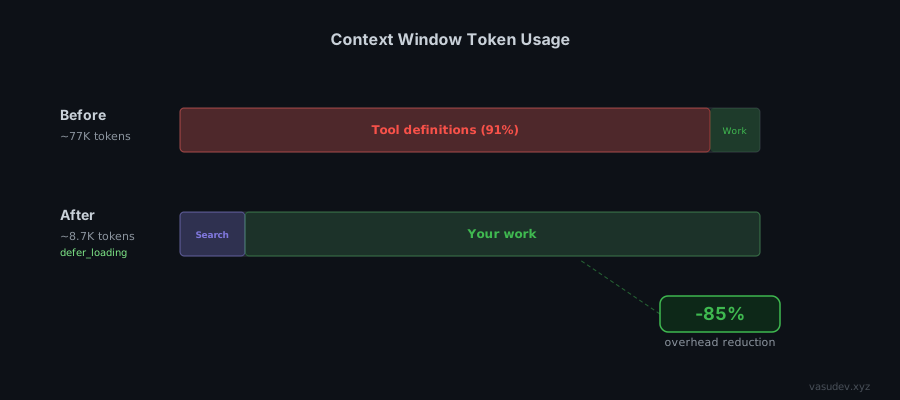
Instead of loading all tool schemas upfront, you mark tools with defer_loading: true. The API receives the definitions but does not inject them into context. Claude starts with a lean context and a single meta-tool (a search tool) that it calls when it needs to discover what’s available.
import anthropic

client = anthropic.Anthropic()

response = client.beta.messages.create(
    betas=["advanced-tool-use-2025-11-20"],
    model="claude-opus-4-6",
    max_tokens=2048,
    tools=[
        # The search tool -- always in context, ~500 tokens
        {"type": "tool_search_tool_bm25_20251119", "name": "tool_search_tool_bm25"},

        # High-frequency tool -- keep loaded
        {"name": "read_file", "description": "...", "input_schema": {...}, "defer_loading": False},

        # Everything else -- on demand
        {"name": "github_create_pr", "description": "...", "input_schema": {...}, "defer_loading": True},
        {"name": "jira_create_issue", "description": "...", "input_schema": {...}, "defer_loading": True},
        # ... 100 more
    ],
    messages=[{"role": "user", "content": "Create a PR for the fix in branch feat/timeout"}]
)
When Claude needs to create a PR, it calls tool_search_tool_bm25 with a natural language query like “create pull request GitHub.” The API returns 3-5 matching tool definitions, which are then injected into context just-in-time. Claude calls the tool. The schemas are discarded after the turn.
Result: ~8.7K tokens per request instead of ~77K. An 85% reduction in overhead.
Two Search Modes
Anthropic ships two built-in search variants. They’re not interchangeable.
BM25 (tool_search_tool_bm25_20251119) uses natural language matching. Claude queries with phrases like “send email to user” or “fetch document from drive.” Use this when your tool names follow different conventions across servers (for example, gmail_send vs send_message vs compose_email). It tolerates naming inconsistency because it matches against descriptions, not just names.
Regex (tool_search_tool_regex_20251119) uses Python re.search() patterns. Claude constructs patterns like github.*pull_request or jira.*issue. Use this when your tool catalog has a strict, predictable naming convention and you want deterministic retrieval. Faster and more precise, but it breaks the moment naming is inconsistent. Patterns are capped at 200 characters.
For most setups with multiple MCP servers, BM25 is the safer default. For internal tool catalogs you control end-to-end, regex gives better precision.
For MCP Servers: Defer the Whole Thing
If you’re calling the Claude API with MCP servers directly (not just raw tool definitions), you can defer an entire server’s tools with mcp_toolset:
{
  "type": "mcp_toolset",
  "mcp_server_name": "github",
  "default_config": {"defer_loading": true},
  "configs": {
    "read_file": {"defer_loading": false}
  }
}
This defers all tools from the github server except read_file, which stays loaded because it’s used in almost every session. Claude Code does a version of this automatically: if connected MCP tool definitions exceed 10K tokens, it marks them as deferred and enables Tool Search without any configuration.
Designing Custom MCP Servers for Tool Search
If you control the server, the design decisions you make upfront determine how well Tool Search retrieves your tools later. Three things matter.
Naming is the regex interface. If you plan to use the regex variant, establish a strict prefix convention from day one: github__create_pr, github__list_issues, jira__create_issue. The double-underscore separator makes github__.* unambiguous. Mixing conventions across a single server (for example, createPR next to list_issues) breaks regex retrieval completely. You’ll be forced onto BM25 for a catalog that should be regex-friendly.
Descriptions are the BM25 interface. Write every tool description as if it’s a search engine snippet, because it is. Lead with the verb and the object: “Create a pull request in a GitHub repository” outperforms “PR creation utility.” Include synonyms for the action when they’re common: “Send an email (compose, deliver message) to one or more recipients via Gmail.” The retrieval model matches against the full description text, so keyword density matters more than elegance.
Decide upfront which tools are always loaded. Every server has 2-3 tools that get called in nearly every session: a read_file, a list_resources, a get_current_user. Mark those defer_loading: false and design the rest around the assumption they’ll be cold. The goal is that cold tools should be self-contained enough that Claude can call them correctly from their description alone, without having seen them before in the session.
One structural decision worth making early: one server with many tools versus several focused servers. Tool Search handles both, but focused servers give you a natural Namespace for regex patterns and make default_config: {defer_loading: true} per-server more granular. A github server and a jira server you can defer independently is cleaner than one project-management server with 80 mixed tools.
Tool Search is in public beta and the retrieval accuracy is not yet production-ready for all workloads. One external test by Arcade.dev loading 4,027 tools across 25 common workflows hit 56-60% retrieval accuracy on the regex variant. Anthropic’s own numbers are better. Opus 4.5 jumps from 79.5% to 88.1%. But those are benchmarks, not production workflows.
The implication: write your tool descriptions as if BM25 has to find them without knowing the tool name. Skip technical jargon in descriptions. “Send transactional email via SMTP” is harder to find than “Send an email to a user.” The retrieval matches against descriptions, so the description is the interface.
Tool Search does not work with tool use examples (few-shot prompting for tool calls). If you rely on examples for accuracy, you need a workaround.
What I Left Out
Prompt caching + deferred tools. Anthropic’s docs mention combining defer_loading with cached tool definitions. I haven’t benchmarked this yet. The interaction between cache invalidation and just-in-time schema injection isn’t obvious. Relevant docs here.
Custom search implementations. You can implement your own search tool using embeddings or semantic search, returning tool_reference blocks. This is the right path for large catalogs (1,000+ tools) where BM25 retrieval accuracy isn’t enough. Anthropic’s code execution with MCP post covers the broader pattern of presenting MCP servers as code APIs rather than direct tool calls. Worth reading as a complement.
Agent SDK support. As of early 2026, the Python Agent SDK doesn’t expose defer_loading as a parameter. You have to drop to the raw API. This GitHub issue is tracking it.
Other model providers. defer_loading is a Claude API feature, not an MCP protocol feature. OpenAI, Gemini, and others don’t have an equivalent yet. If you’re building provider-agnostic agents, you need a client-side routing layer instead.
Enable defer_loading on anything you don’t use in every session. That’s probably 80% of your tools. Start with the official docs and the Anthropic engineering post for the full API reference.
Christian Pojoni builds context-efficient agents. More at vasudev.xyz.