Tu configuración MCP está consumiendo el 90 % de su ventana de contexto. Aquí tienes la solución.
Connect GitHub’s MCP server to Claude. Now check your token counter before sending a single message. 46,000 tokens, 22% of Claude Opus’s context window, consumed by tool definitions you haven’t used yet. Add Jira (another ~17K), a Slack server, Google Drive, and you’re pushing 100K+ tokens of overhead before any actual work begins. Anthropic benchmarked internal setups reaching 134K tokens in tool definitions alone.
Every MCP tool you connect is a tax paid upfront, whether the tool gets used or not.
This is the default behavior of MCP clients today: load all tool definitions into context at the start of every request. The spec doesn’t require it. It’s just the path of least resistance, and it scales badly.
Por Qué Sucede
Los servidores MCP anuncian sus herramientas como objetos de esquema JSON: nombres, descripciones, tipos de parámetros, campos requeridos, ejemplos. Estos esquemas son útiles. Son la forma en que Claude sabe qué hace una herramienta y cómo llamarla correctamente. Pero “útil” y “necesita estar en contexto en todo momento” son cosas diferentes.
Una configuración de cinco servidores (GitHub con 91 herramientas, Jira, Slack, Google Drive, un servidor interno personalizado) podría exponer un total de 140 herramientas. Con aproximadamente 400‑600 tokens por definición de herramienta, eso representa entre 55 K y 85 K tokens consumidos antes de que hayas formulado una pregunta. El modelo también se degrada bajo esta carga: los benchmark de Anthropic muestran que la precisión en la selección de herramientas colapsa a medida que aumenta el número de herramientas, porque el modelo tiene que mantener demasiadas opciones en atención simultáneamente.
Más herramientas en contexto = más tokens quemados + peores decisiones sobre qué herramienta usar. Es una doble penalización.
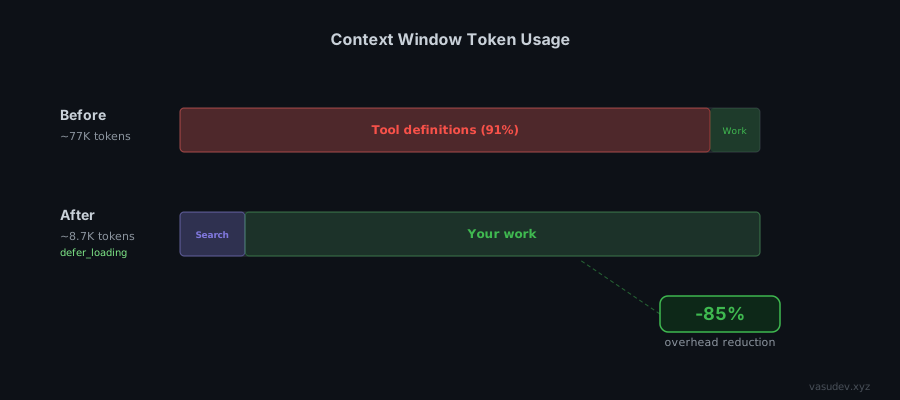
La solución: defer_loading y Búsqueda de Herramientas
Anthropic lanzó una solución en noviembre de 2025 bajo el encabezado beta advanced-tool-use-2025-11-20. El mecanismo se llama carga diferida, y el patrón que permite se denomina Búsqueda de Herramientas.
En lugar de cargar todos los esquemas de herramientas por adelantado, marcas las herramientas con defer_loading: true. La API recibe las definiciones pero no las inyecta en el contexto. Claude comienza con un contexto reducido y una meta‑herramienta única (una herramienta de búsqueda) que llama cuando necesita descubrir qué está disponible.
import anthropic

client = anthropic.Anthropic()

response = client.beta.messages.create(
    betas=["advanced-tool-use-2025-11-20"],
    model="claude-opus-4-6",
    max_tokens=2048,
    tools=[
        # La herramienta de búsqueda -- siempre en contexto, ~500 tokens
        {"type": "tool_search_tool_bm25_20251119", "name": "tool_search_tool_bm25"},

        # Herramienta de alta frecuencia -- mantener cargada
        {"name": "read_file", "description": "...", "input_schema": {...}, "defer_loading": False},

        # Todo lo demás -- bajo demanda
        {"name": "github_create_pr", "description": "...", "input_schema": {...}, "defer_loading": True},
        {"name": "jira_create_issue", "description": "...", "input_schema": {...}, "defer_loading": True},
        # ... 100 más
    ],
    messages=[{"role": "user", "content": "Create a PR for the fix in branch feat/timeout"}]
)
Cuando Claude necesita crear un PR, llama a tool_search_tool_bm25 con una consulta en lenguaje natural como “create pull request GitHub.” La API devuelve de 3 a 5 definiciones de herramientas coincidentes, que se inyectan en el contexto justo a tiempo. Claude llama a la herramienta. Los esquemas se descartan después del turno.
Resultado: ~8.7K tokens por solicitud en lugar de ~77K. Una reducción del 85 % en la sobrecarga.
Two Search Modes
Anthropic ships two built-in search variants. They’re not interchangeable.
BM25 (tool_search_tool_bm25_20251119) uses natural language matching. Claude queries with phrases like “send email to user” or “fetch document from drive.” Use this when your tool names follow different conventions across servers (for example, gmail_send vs send_message vs compose_email). It tolerates naming inconsistency because it matches against descriptions, not just names.
Regex (tool_search_tool_regex_20251119) uses Python re.search() patterns. Claude constructs patterns like github.*pull_request or jira.*issue. Use this when your tool catalog has a strict, predictable naming convention and you want deterministic retrieval. Faster and more precise, but it breaks the moment naming is inconsistent. Patterns are capped at 200 characters.
For most setups with multiple MCP servers, BM25 is the safer default. For internal tool catalogs you control end-to-end, regex gives better precision.
Para servidores MCP: Deferir todo
Si llamas a la API de Claude con servidores MCP directamente (no solo definiciones de herramientas sin procesar), puedes diferir todas las herramientas de un servidor con mcp_toolset:
{
  "type": "mcp_toolset",
  "mcp_server_name": "github",
  "default_config": {"defer_loading": true},
  "configs": {
    "read_file": {"defer_loading": false}
  }
}
Esto difiere todas las herramientas del servidor github excepto read_file, que permanece cargada porque se usa en casi todas las sesiones. Claude Code hace una versión de esto automáticamente: si las definiciones de herramientas MCP conectadas superan los 10 K tokens, las marca como diferidas y habilita la Búsqueda de Herramientas sin ninguna configuración.
Designing Custom MCP Servers for Tool Search
If you control the server, the design decisions you make upfront determine how well Tool Search retrieves your tools later. Three things matter.
Naming is the regex interface. If you plan to use the regex variant, establish a strict prefix convention from day one: github__create_pr, github__list_issues, jira__create_issue. The double-underscore separator makes github__.* unambiguous. Mixing conventions across a single server (for example, createPR next to list_issues) breaks regex retrieval completely. You’ll be forced onto BM25 for a catalog that should be regex-friendly.
Descriptions are the BM25 interface. Write every tool description as if it’s a search engine snippet, because it is. Lead with the verb and the object: “Create a pull request in a GitHub repository” outperforms “PR creation utility.” Include synonyms for the action when they’re common: “Send an email (compose, deliver message) to one or more recipients via Gmail.” The retrieval model matches against the full description text, so keyword density matters more than elegance.
Decide upfront which tools are always loaded. Every server has 2-3 tools that get called in nearly every session: a read_file, a list_resources, a get_current_user. Mark those defer_loading: false and design the rest around the assumption they’ll be cold. The goal is that cold tools should be self-contained enough that Claude can call them correctly from their description alone, without having seen them before in the session.
One structural decision worth making early: one server with many tools versus several focused servers. Tool Search handles both, but focused servers give you a natural Namespace for regex patterns and make default_config: {defer_loading: true} per-server more granular. A github server and a jira server you can defer independently is cleaner than one project-management server with 80 mixed tools.
Tool Search is in public beta and the retrieval accuracy is not yet production-ready for all workloads. One external test by Arcade.dev loading 4,027 tools across 25 common workflows hit 56-60% retrieval accuracy on the regex variant. Anthropic’s own numbers are better. Opus 4.5 jumps from 79.5% to 88.1%. But those are benchmarks, not production workflows.
The implication: write your tool descriptions as if BM25 has to find them without knowing the tool name. Skip technical jargon in descriptions. “Send transactional email via SMTP” is harder to find than “Send an email to a user.” The retrieval matches against descriptions, so the description is the interface.
Tool Search does not work with tool use examples (few-shot prompting for tool calls). If you rely on examples for accuracy, you need a workaround.
Lo Que Dejé Fuera
Almacenamiento de prompts + herramientas diferidas. La documentación de Anthropic menciona combinar defer_loading con definiciones de herramientas en caché. Aún no he hecho benchmarks de esto. La interacción entre la invalidación de caché y la inyección de esquemas justo a tiempo no es obvia. Documentación relevante aquí.
Implementaciones de búsqueda personalizadas. Puedes crear tu propia herramienta de búsqueda usando embeddings o búsqueda semántica, devolviendo bloques tool_reference. Esta es la vía correcta para catálogos grandes (más de 1 000 herramientas) donde la precisión de recuperación BM25 no es suficiente. El artículo de Anthropic sobre ejecución de código con MCP cubre el patrón más amplio de presentar servidores MCP como APIs de código en lugar de llamadas directas a herramientas. Vale la pena leerlo como complemento.
Soporte del SDK de agentes. A comienzos de 2026, el SDK de Agentes de Python no expone defer_loading como parámetro. Tienes que usar la API cruda. Este issue de GitHub lo está rastreando.
Otros proveedores de modelos. defer_loading es una característica de la API de Claude, no del protocolo MCP. OpenAI, Gemini y otros aún no tienen un equivalente. Si construyes agentes independientes del proveedor, necesitas una capa de enrutamiento del lado del cliente en su lugar.
Activa defer_loading en todo lo que no uses en cada sesión. Probablemente sea el 80 % de tus herramientas. Comienza con la documentación oficial y el post de ingeniería de Anthropic para la referencia completa de la API.
Christian Pojoni crea agentes eficientes en contexto. Más en vasudev.xyz.
La imagen de portada de este post fue generada por IA.